






The UAE Ministry of Interior (MOI) provides online services for traffic and licensing, police matters, and Civil Defence. Residents and businesses can use the official website or MOI UAE mobile app to access eligible government transactions, check requirements, and submit applications.
Choosing the right service matters because not every transaction follows the same process. The application route, required documents, fees, and processing times depend on the service and the authority responsible for the record. This guide covers MOI UAE login, traffic fines, driving licences, police clearance certificates, business services, and common technical problems.
What Is MOI UAE?
MOI UAE stands for the Ministry of Interior of the United Arab Emirates. The ministry provides government services relating to traffic and licensing, policing, Civil Defence, and other areas within its responsibilities. Its digital platforms allow users to complete eligible transactions online instead of visiting a service centre for every request.
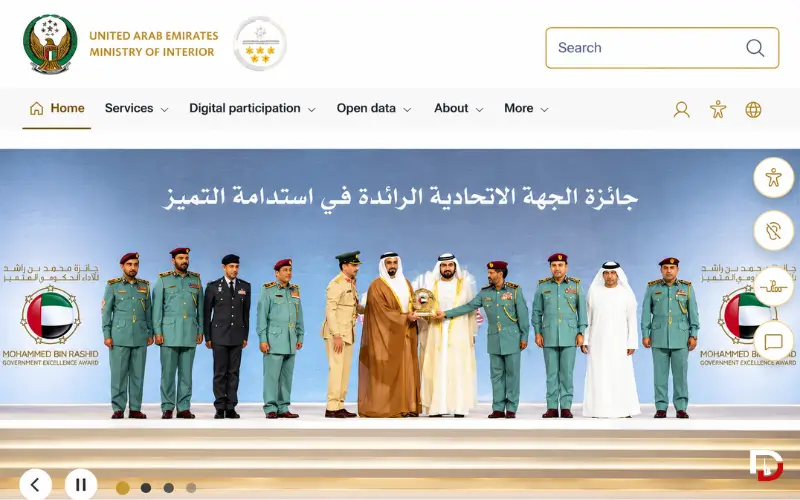
The official website is moi.gov.ae. The ministry also offers the MOI UAE mobile app for Android and iPhone users.
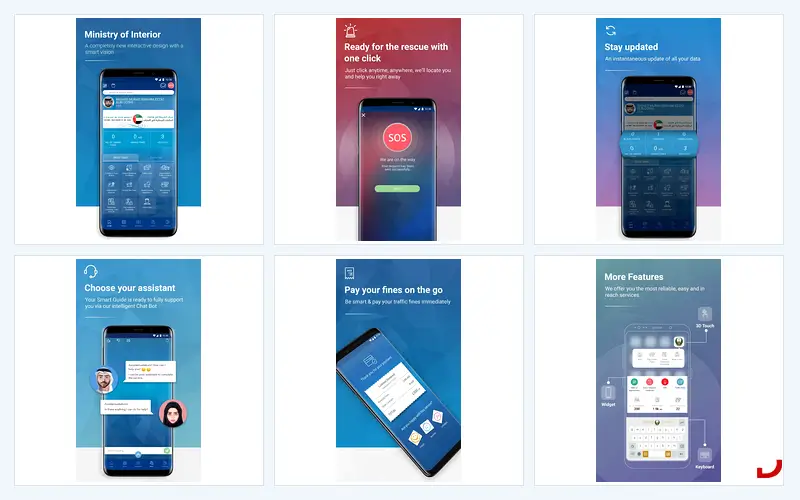
The official app lists three main service sectors: Traffic and Licensing, Civil Defence, and Police Headquarters. Other features include service-centre searches, appointment ticketing, and Ministry news.
Quick Facts
| Detail | Information |
| Official name | Ministry of Interior, United Arab Emirates |
| Official website | moi.gov.ae |
| Digital services | Traffic and Licensing, Civil Defence, Police Headquarters, nd other listed services |
| Mobile app | MOI UAE |
| Android download | Google Play |
| iPhone download | Apple App Store |
| Support email listed in the app store | moi@moi.gov.ae |
| Support number | 800 5000; check the official portal to confirm current availability |
Accessing the portal does not necessarily mean that a transaction is free. Individual services may carry government fees, and the amount depends on the application. Check the relevant service page for current charges, eligibility conditions, and expected processing times before submitting a request.
MOI UAE Official Website and App
The MOI UAE website and mobile app provide access to the ministry’s digital services. Your best starting point depends on whether you need to check a traffic violation, renew a licence, apply for a certificate, or complete a business transaction.
How to use the MOI UAE website
Follow these steps to find the relevant service:
- Visit moi.gov.ae.
- Select English or Arabic if the language option is available.
- Open the appropriate service category.
- Search for the transaction you need.
- Read the service description and eligibility conditions.
- Follow the displayed instructions for authentication, document submission, and payment, where applicable.
The exact process varies between services. Some transactions have dedicated service pages or use separate systems, so a service may require additional steps beyond those shown on the main portal.
How to download the official MOI UAE app
Android users can search for MOI UAE on Google Play, while iPhone users can find the application through Apple’s App Store. Before installing it, check the developer information and confirm that you have selected the official application.
Once installed, open the app and select the service you need. The published features include driver and vehicle licensing, traffic-fine services, Civil Defence transactions, police-related services, service-centreinformation,,n and appointment ticketing.
Use the official app-store listings to check the current version and available features. An option described in an older version may have changed, so follow the instructions displayed in the installed application.
How to Log In to MOI UAE
The login process depends on the service you want to access. Some transactions require identity verification, while others may provide different authentication options. Check the instructions on the relevant service page rather than assuming that every MOI transaction uses the same login method.
Steps to access a service
- Open the official MOI UAE website or mobile app.
- Select the service you want to use.
- Choose the login or authentication option displayed.
- If the service offers or requires UAE PASS, complete the official authentication process.
- Return to the MOI service and continue with your application.
First-time users should check whether the selected transaction requires account registration or identity verification. Having access to the portal does not automatically mean that every service is available without further authentication.
Also Explore: Al Awir Immigration Office Dubai
Do you need UAE PASS for MOI UAE?
UAE PASS is the UAE’s national digital identity platform. It allows users to verify their identity and access participating government and private-sector services through supported authentication methods.
MOI users should follow the login instructions for the specific transaction. Not every service necessarily requires UAE PASS, and creating a UAE PASS account does not automatically complete an MOI application.
For registration, account access, and recovery, visit the official UAE PASS website.
MOI UAE e-Services
The MOI UAE app groups its principal services into Traffic and Licensing, Civil Defence, and Police Headquarters. Each category covers different transactions, so selecting the correct one can save time and help you avoid submitting information through the wrong application route.
Traffic and Licensing
Traffic and Licensing covers services relating to vehicles, driving licences, and traffic violations. The official app listing includes:
- Vehicle licensing.
- Driving-licence services.
- Traffic-fine inquiries and payments.
- Number-plate services.
- Other traffic-related transactions listed in the service catalogue.
The available options depend on the transaction and the authority responsible for the record. If your vehicle or driving licence does not appear, check the details you entered and confirm that you selected the appropriate service.
Civil Defence
Civil Defence services cover areas such as business and institutional licensing, drawing approvals, prevention and safety procedures, vehicle safety, and awareness or training services.
Certain transactions are handled through the dedicated MOI Civil Defence e-services system. This platform provides information for establishments and businesses, including applicable document requirements and application procedures.
Before starting a business application, read the relevant service card carefully. It may specify company details, supporting documents, eligibility conditions, safety requirements, and payment steps that do not apply to other MOI services.
Police Headquarters
The MOI UAE app also provides access to police-related services. Its published features include criminal-status services, electronic police tools, home security, and prisoner visits.
Each service serves a different purpose and may require separate information or documentation. A Police Clearance Certificate application, for example, is different from a traffic-fine inquiry, even though both fall within the wider range of government services.
Open the relevant police service and review its instructions before entering personal details or uploading documents. If the service concerns a particular emirate, check whether the responsible local police authority provides a separate application route.
Other MOI digital services
The official app listing includes additional transactions, such as passport renewal. Availability depends on the service, the applicant’s eligibility,y and the requirements displayed by the responsible authority.
If you cannot find a transaction in the app, search the official MOI website or the UAE Government Services Directory. The directory can help identify the government entity responsible for a service that does not appear in the main app catalogue.
How to Check and Pay MOI UAE Traffic Fines
MOI UAE provides an official service for checking and paying eligible traffic fines. The ministry’s published traffic-fine manual describes search options that include a traffic profile number and vehicle plate information.
Before searching, make sure you have the correct details for the vehicle or traffic record. The available search fields may vary according to the service you select.
Steps to check traffic fines
- Open the official MOI UAE website or app.
- Select the Traffic and Licensing category.
- Open the traffic-fine inquiry or payment service.
- Choose one of the available search methods.
- Enter the requested traffic profile or vehicle plate details.
- Complete any security verification displayed.
- Review the violations returned by the system.
The official MOI website is the appropriate starting point for the current service. You can also consult the ministry’s published traffic-fine manual for additional information about its search fields.

How to pay a traffic fine
When a violation is eligible for payment, follow the instructions displayed by the official service. Check the violation details and outstanding amount before authorising the transaction.
Save the payment confirmation or receipt if the system provides one. If the payment fails or the application remains pending, check your bank or card account and the application status before attempting another payment.
Some violations may require further action before payment becomes available. The MOI app’s published update history, for example, describes situations involving non-payable fines and the need to resolve black-point requirements first. Follow the instructions attached to your particular violation rather than assuming every fine can be paid immediately.
Why is a traffic fine missing from MOI UAE?
A missing violation does not necessarily mean that the authority has cancelled it. The search details may be incorrect, the record may belong to a different authority, or the information may not be available through the service you selected.
Check the following before contacting support:
- Confirm that the traffic profile or vehicle plate details are correct.
- Check whether the violation belongs to the federal traffic system or a local authority.
- Review the relevant police or transport authority’s official service.
- Contact the responsible authority if the record remains missing or does not match your information.
The UAE Government lists several official channels for traffic-fine services, including MOI, Emirates Vehicle Gate, Abu Dhabi Police, Dubai Police, RTA Dubai and Ras Al Khaimah eGovernment. The correct channel depends on the issuing authority and the record you need to access. See the official UAE road-safety guidance.
How to dispute an incorrect traffic fine
If you believe a traffic violation was recorded incorrectly, check the objection procedure provided by the authority that issued it. The process can differ between emirates and between federal and local traffic systems.
Keep the violation details and any relevant supporting evidence ready. Submit the objection through the official channel and retain the reference number so you can follow up on its status.
Do not assume that an objection submitted to one authority will automatically reach another. Dubai Police operates its own traffic services, for example, while applicable federal traffic records may be handled through MOI. Confirm the responsible authority before submitting your request.
Driving Licence and Vehicle Services
MOI provides access to traffic and licensing services, but the correct application route depends on the transaction and the authority responsible for the relevant record. Checking the service requirements before starting can help prevent delays caused by missing documents or incorrect application details.
Driving-licence renewal
Before renewing a driving licence, review the relevant service page for eligibility, outstanding requirements, supporting documents, fees and available delivery options. Follow the instructions for the licence and issuing authority involved in your application.
If your licence does not appear, check whether you are using the correct traffic file and whether the relevant authority holds the record. Avoid starting another application until you understand why the existing record is unavailable.
For Dubai-specific driving-licence services, consult RTA Dubai. For other cases, use the authority identified in the official service instructions.
Vehicle registration and renewal
Vehicle registration and renewal may require vehicle details and compliance with the relevant licensing conditions. The process depends on the vehicle, its existing registration record,r,d and the authority responsible for the transaction.
Check whether the service requires any additional action before submitting an application. If your vehicle does not appear in your account, verify the registration details and responsible authority before creating another request.
Traffic clearance certificate
A traffic clearance certificate is a separate service from an ordinary traffic-fine inquiry. MOI has published a service manual explaining how applicants can select the relevant clearance-certificate service and proceed using available identifiers, such as a traffic profile number, plate number, or driving-licence details.
Check the current service card for eligibility, required information, and applicable fees. The instructions displayed for the selected transaction should determine which details you need to provide.
Police Clearance Certificate Through MOI UAE
A Police Clearance Certificate (PCC), also called a Good Conduct Certificate, provides information about a person’s criminal record. Employers, educational institutions, immigration authorities, and other organisations may request this document for official purposes.
The UAE Government lists the MOI website and mobile app among the available application channels for eligible applicants. People applying through Dubai may also be able to use the official Dubai Police channels. Check the UAE Government’s Police Clearance Certificate guidance before choosing an application route.
How to apply for a police clearance certificate
- Open the relevant official MOI or local police service.
- Check whether the application route covers your circumstances.
- Review the identity information and supporting documents required.
- Complete the application according to the displayed instructions.
- Pay the applicable fee, if required.
- Follow the service instructions to track the application and receive the certificate.
Requirements may differ according to your current residence and the authority handling the request. Former UAE residents may need additional documentation, so check the applicable service page before submitting an application.

What if your employer is missing from the application list?
An employer or organisation may not always appear under the name an applicant expects. If you cannot find the correct option in a police-clearance application, check whether the organisation uses another official name and review the instructions for your applicant category.
Do not select an unrelated employer or organisation simply to move past the form. If the correct option remains unavailable, contact the service provider through its official support channel and ask how to proceed.
An app-store review can point to a possible application problem, but an individual report does not establish that every applicant experiences the same issue. Confirm the current position with the responsible service provider.
Civil Defence Services for Businesses
Civil Defence applications may involve additional requirements because they can relate to company licences, technical drawings, safety compliance or establishments operating in regulated premises.
The dedicated MOI Civil Defence services portal provides information about the applicable electronic services and service centres. Business owners and authorised representatives should consult the relevant service page rather than relying only on the general MOI app description.
Before submitting an application, confirm:
- Whether the service is intended for an individual, company or establishment.
- Whether company registration is required.
- Which supporting documents must accompany the application.
- Whether safety requirements, technical approvals or inspections apply.
- Which fees and payment methods are currently listed.
- Whether the transaction can be completed online or requires a service-centre visit.
The specific service card is the most relevant starting point for understanding an application’s requirements. Check it before preparing documents or paying a fee, particularly when the transaction involves a business licence or safety approval.
MOI UAE Fees, Documents and Processing Times
MOI UAE does not have one standard fee or processing time for every transaction. Traffic services, police applications, and Civil Defence approvals have different requirements, and the amount payable depends on the service you select.
Before submitting an application, check the official service card for the following details.
| Detail | What to verify |
| Eligibility | Whether you can apply for the service |
| Documents | Required identity, vehicle,e or company records |
| Fees | Current charges for the selected transaction |
| Processing time | The expected timeframe stated by the service |
| Payment | Available methods and payment conditions |
| Delivery | How the completed document or service will be provided |
| Follow-up | How to check application status or contact support |
If the service page does not answer your question, contact the responsible authority before making a payment. Avoid relying on old screenshots or fees copied from another transaction, as the requirements may differ.
MOI UAE vs Other UAE Government Portals
MOI is one part of the UAE’s wider digital-government system. Other authorities handle specific identity, residency, policing and transport transactions. Knowing which organisation manages a record can help you avoid using the wrong portal.
| Platform | Main role |
| MOI UAE | Ministry of Interior services, including traffic, licensing, Civil Defence and police-related transactions |
| UAE PASS | Digital identity and authentication for participating services |
| ICP | Identity, citizenship, customs and port-security responsibilities, including relevant identity and residency services |
| Dubai Police | Dubai police services and relevant local traffic transactions |
| RTA Dubai | Dubai transport, driving-licence and vehicle-related services |
| Abu Dhabi Police | Abu Dhabi police and relevant traffic services |
| Abu Dhabi Mobility and TAMM | Applicable Abu Dhabi transport and government transactions |
These platforms are not interchangeable. For example, an inquiry about an entry permit or residency record may need to go through ICP or another relevant residency authority rather than an MOI traffic service.
If you are unsure which organisation handles your transaction, consult the UAE Government Services Directory. Check the service provider before entering personal information or submitting an application.
MOI UAE Login and Payment Problems
Technical issues can interrupt an application even when you have entered the correct details. Start with the checks relevant to the problem, then contact the official service provider if you cannot resolve it.
MOI UAE login is not working
First, confirm that you are using the official website or app and that your internet connection is working. If the service uses UAE PASS, follow its authentication instructions and check whether the login process has completed successfully.
If you still cannot access the service, record the error message and contact official support. Avoid submitting the same application repeatedly when you cannot confirm whether an earlier attempt succeeded.
MOI UAE OTP is not arriving
Check whether your registered phone number is active and can receive text messages. Follow the instructions displayed by the service, and request another verification code only when appropriate.
If you no longer have access to the registered number, use the official account-recovery or support process. Never share a one-time password (OTP) with anyone who contacts you claiming to represent customer support.
Payment was deducted, but the application is pending
Check the application status and payment confirmation before taking further action. Review your bank or card account to determine whether the transaction was completed, remains pending, or was reversed.
Keep the transaction reference and any available receipt. If the application remains unresolved, contact the responsible service provider before making another payment. This helps you avoid paying twice for a transaction whose status is still unclear.
The app shows an internet connection error.r
Check whether other websites and apps can connect to the internet. If your connection works elsewhere, close and reopen the MOI UAE app, check whether an official update is available, and try again later if a temporary service issue is possible.
If the problem continues on both Wi-Fi and mobile data, record your device details and the error message for support. Do not install unofficial versions of the app or share your account credentials with third-party troubleshooters.
Incorrect traffic details or duplicate traffic codes
If your traffic file contains incorrect personal details, duplicate codes, or records that do not match another authority’s system, contact the authority responsible for the original licence or traffic file before creating another record.
Explain the discrepancy and provide the relevant reference details through an official channel. Keep any supporting documents available in case the authority needs them to investigate the issue.
Public discussions have included reports of mismatched traffic codes, fines, and black-point information between federal and Dubai systems. Such reports describe individual experiences and do not establish that every user will encounter the same problem. Verify your own record with the responsible authority.
MOI UAE Contact and Support
The official Google Play listing provides the support email moi@moi.gov.ae. It also lists a telephone number for the Ministry, but users should check the official portal or current app listing to confirm the contact details and availability before calling.
When contacting support, explain which service you were using, when the problem occurred, and what error message appeared. Include the transaction reference if one is available, and provide sensitive identity or vehicle information only through an official channel when required.
If the issue concerns a local authority’s record, contact that authority directly. This is particularly important when a traffic violation, licence, or application status differs between platforms, because the organisation that issued the record may need to investigate it.

Conclusion
MOI UAE brings together digital services covering traffic and licensing, Civil Defence, and police-related transactions. Users can save time by identifying the correct service, checking its requirements, and following the instructions provided for the specific application.
When a fine is missing, a login fails, or a payment remains pending, verify the relevant details before trying again. Contacting the authority responsible for the record is often the clearest way to resolve a problem without creating duplicate applications or unnecessary payments.
Also Explore: UAE Overstay Fine Check
Frequently Asked Questions
What is the official MOI UAE website?
The official website is moi.gov.ae. It provides access to Ministry of Interior digital services and information about the transactions available through its online platforms.
How can I download the MOI UAE app?
Android users can search for the official MOI UAE app on Google Play. iPhone and iPad users can look for it through the Apple App Store. Check the developer information before installing the application.
Can I check and pay traffic fines through MOI UAE?
Yes. MOI provides traffic-fine inquiry and payment services. The available search methods and whether a violation can be paid online depend on the record and the responsible authority.
Why is my traffic fine not appearing in the MOI UAE app?
Check your traffic profile or vehicle plate details and confirm which authority recorded the violation. If the fine remains missing, consult the relevant official traffic or police service to verify the record.
Does every MOI UAE service require UAE PASS?
No universal requirement should be assumed. Follow the authentication instructions displayed for the specific service, as login requirements can vary between transactions.
Can I apply for a police clearance certificate through MOI UAE?
The UAE Government lists the MOI website and app among the application channels for eligible applicants. Requirements and available routes depend on the applicant’s circumstances and the police authority responsible for the request.
What should I do if an MOI UAE payment fails?
Check your bank or card account and the application status before attempting another payment. Keep the transaction reference and contact official support if you cannot confirm whether the payment succeeded.
How do I contact MOI UAE support?
The official app listing provides the email address moi@moi.gov.ae. Check the current contact information on the official website or app listing before contacting the Ministry.
Is MOI UAE responsible for all visa and residency services?
No. ICP or another relevant authority may handle identity, entry-permit, and residency transactions. Check the UAE Government Services Directory to identify the organisation responsible for your particular application.