






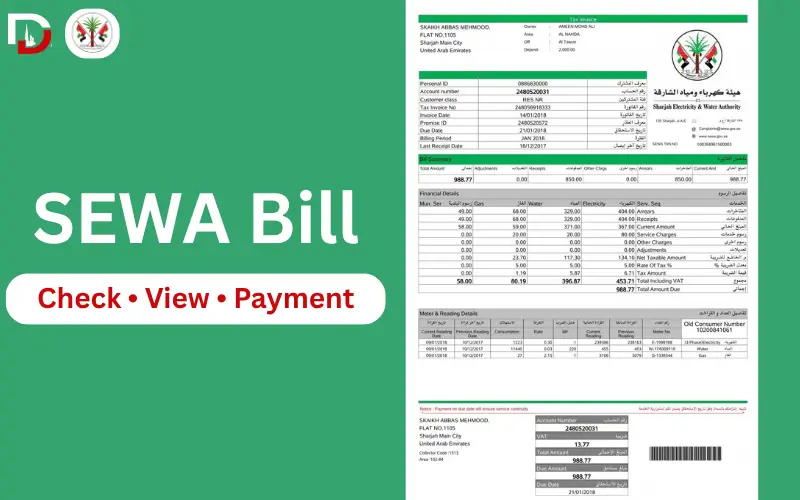
Check your SEWA bill online in under 2 minutes. All you have to do is go to the SEWA portal or app, enter your account number, click on Bill Inquiry, and view outstanding balance, due date, and consumption history instantly. Be a tenant, homeowner, or business account holder, everything is the same: your SEWA account number has access to all the online services, such as checking one bill, or getting access to complete account management with Smart services.
Official SEWA Service Links
| Official Service | Link |
| SEWA Official Website | sewa.gov.ae |
| e-Services Portal (login) | eservices.sewa.gov.ae |
| One Time Payment (no login) | eservice.sewa.gov.ae/portal/One-TimePayment.aspx |
| Smart App — Android | Google Play: search “SEWA” |
| Smart App — iOS | Apple App Store: search “SEWA” |
Always confirm you’re on sewa.gov.ae before entering account details. Unofficial bill-check sites can look similar but aren’t affiliated with SEWA.
What You Need Before You Start
In order to check or pay, always have your SEWA account number with you, as it is necessary for web, WhatsApp, phone, and bank payments. The mobile app can be configured with the account number or a login to UAE PASS. A good GPS connectivity and a registered mobile number will also be useful, as some payment methods require the OTP verification code upon completing the payment.
| Want to… | Go To |
| Check the current bill | How to Check SEWA Bill Online |
| Pay without an account | One-Time Payment section |
| Pay the bill | How to Pay SEWA Bill Online |
| View the previous bill | Previous Month’s Bill section |
| Download PDF/statement | How to Check SEWA Bill Online |
| Contact customer care | SEWA Customer Care and Support |
| See tariff rates | SEWA Tariff Rates section |
How to Check SEWA Bill Online
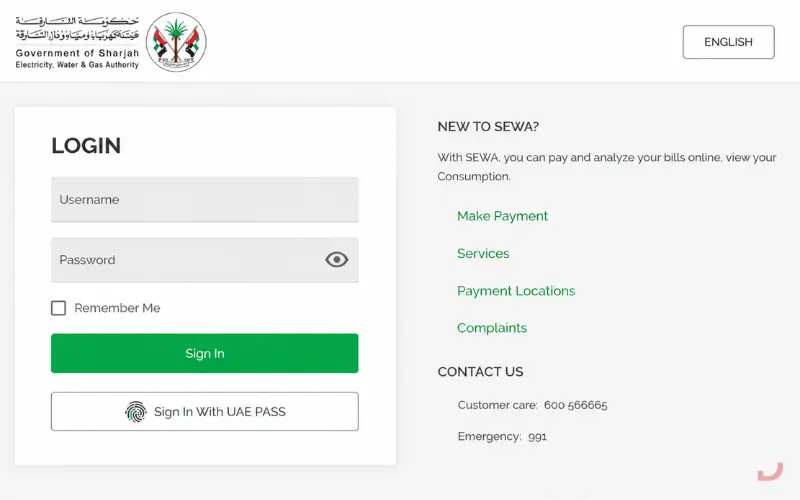
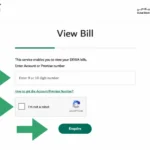
SEWA Bill Check Online, visit the SEWA official e-Services portal, enter your bill number, and choose Bill Inquiry. Your impressive balance, the due date, and consumption history on the system are immediately visible.
Step 1: Visit the official SEWA website (sewa.gov.ae) or the e-services Portal.
Step 2: Click on “Bill Inquiry” or the online payment section.
Step 3: On the SEWA account number window (also known as account number, consumer number, and customer ID), enter your SEWA account number, consumer number, or customer ID and then click Next.
Step 4: Check the data of your current bill, balance owing, and when it’s due.
Step 5: Click print/down to save the SEWA bill PDF/statement to your records.
Must Read: Etihad Water and Electricity Bill Check
Can you check the EWA Bill without an Account Number?
No, your SEWA account number will only be used to view or print your bill, as it’s a unique reference linked to your service account/ meter number. Not doing so will prevent the system from being able to match you to a utility account.
Your account number is found on your previous utility bill, documents provided at the time of your new connection,n or the SMS notification you receive from SEWA. Alternatively, it can be requested through the customer call center by bringing the Emirates ID and Property address to validate the request.
SEWA One-Time Payment (Without Login)
You can see and pay back an unconfirmed bill without e-Services registration or login on SEWA’s One Time Payment page.
It is good for a bill search following an online transaction, to pay one bill for someone else, or when you don’t want to open a complete account to pay one bill. Click on the One Time Payment link provided in sewa.gov.ae, input the account number, verify the outstanding amount, and pay the outstanding amount by card. Even if you don’t have a registered profile, you still receive a payment confirmation and a reference for transactions by SMS and e-mail.
How to Check SEWA Bill Using the Mobile App
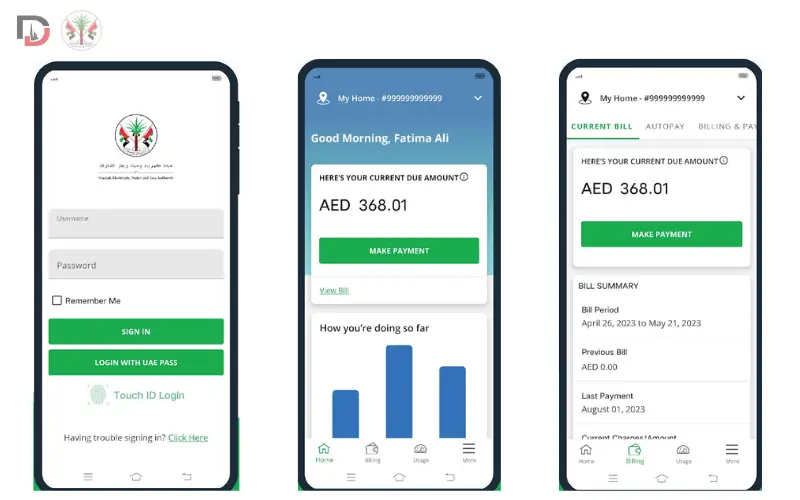
You can check on your bill, see your consumption, and pay it all without even going on the website with the SEWA Smart App.
Download the SEWA mobile app from Google Play or from the Apple App Store, and sign in using your SEWA account details or sign in straight with UAE PASS. Upon logging in, the dashboard will display your current bill, previous bills, and a tracking of your electricity and water use per day.
For SEWA login, the same user ID and password are required as those used in the e-Services Portal,tal and if you have already registered online, then you need not register again to access the SEWA login through the app. If users don’t have a portal account, they can register directly in-app in a few simple steps.
Must Read: DEWA Bill Check
How to Check the Previous Month’s SEWA Bill
Your SEWA bills are not available solely in your SEWA account balance, but also in your SEWA bill history in either the e-Services portal or the Smart App.
Log in, go to Bill History/Statement, and choose any past month to view and/or download it as a PDF. This is useful to compare consumption from month to month; it’s also useful if you need to show a landlord that you’ve paid on time, and it is useful if there is a sudden increase in consumption.
Please email info@sewa.gov.ae with your account number if you don’t see an older bill, or visit any use customer happiness centers.
How to Pay SEWA Bill Online
You can pay your SEWA bill online via e-Services Portal, the Smart App, Digital Sharjah, or your bank’s App; all this indicates instant payment in minutes to 24 hours.
SEWA e-Services Portal: Pay the outstanding bill by credit or debit card using the SEWA e-Services Portal, which is to be registered with your Emirates ID. The processing fee is 1.25% of the total amount due, and partial payments are NOT accepted.
SEWA Smart App: Log in to SEWA Smart App (or UAE PASS) and then proceed to select your bill, choose the mode of payment, and confirm. Payment will be received via SMS or e-mail.
Digital Sharjah App: Facilitates SEWA payments using Apple Pay, Google Pay,y and Samsung Pay in the absence of cards at check-out.
Banking Apps: Install & add SEWA as a biller in the banking App (most major UAE banking institutions, including FAB and Emirates NBD, offer this) and make direct payments.
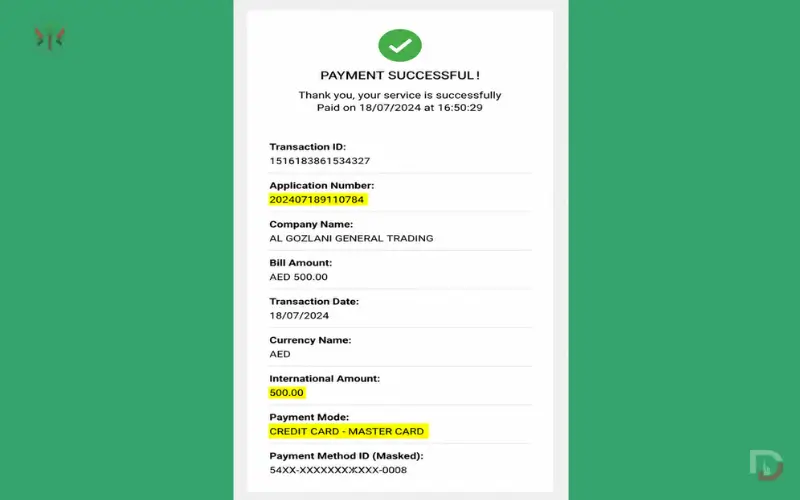
No matter how you make the payment, be sure to retain the payment receipt or bill reference number until the outstanding account shows as posted, so you can quickly notice the issue if any available amount is still outstanding.
Must Read: FEWA Bill Check
SEWA Bill Payment Methods Compared
| Method | Instant? | Fee | 24/7 Available |
| e-Services Portal (card) | Yes | 1.25% | Yes |
| Smart App | Yes | 1.25% (card) | Yes |
| Bank transfer/app | 1–3 working days | None (usually) | Yes |
| Customer Happiness Centre | Same day | None | No (branch hours) |
| Currency Exchange / Etisalat kiosk | Same day | None | Varies by location |
Offline SEWA Bill Payment Methods
Prefer to pay in person or with cash? SEWA supports several offline channels across Sharjah, and none of them charge the 1.25% card processing fee that applies online.
| Method | Details |
| Customer Happiness Centres | Pay by card or cash at any branch — 7+ locations across Sharjah, including a 24-hour Halwan centre. |
| Partner Banks | 22 banks, including Emirates NBD, ADCB, Mashreq, FAB, RAK Bank, and Sharjah Islamic Bank, accept SEWA payments in branch or via online banking. |
| Currency Exchanges | Al Ansari Exchange, Wall Street Exchange, Joyalukkas, and LuLu Exchange accept cash or debit cards. |
| Etisalat Payment Machines | Located at Sharjah Mega Mall, Sahara Centre, Sharjah City Centre, and other malls. |
| Emirates Post Offices | Accepted at branches across Sharjah and Dubai. |
Common SEWA Bill Errors and How to Fix Them
The majority of SEWA bill issues can be solved very easily; they are grouped here.
- If payment was deducted, but the bill has not been updated, wait up to 24 hours and then call the customer care number, including the transaction reference number.
- Check bill: Think of this as a comparison function and compare with previous months; AC overuse in hot summer months; inspect invisible water leaks.
- Informational: Faulty account number – check against past bill or contact customer care to confirm.
- If the bill is not available online, please verify the delivery of the OTP on your registered mobile number or access it on the mobile app instead of the bill.
- Missed due: pay now – SEWA could cut off supplies within about a week of non-payment of the supply amount, and reconnections require it to be physically reconnected, which can only be done with payment of reconnection charges.
Understanding Your SEWA Bill Breakdown
Every SEWA bill has the same five sections, whether viewed online, in the app, or on a printed copy.
| Section | Description |
| Account Details | Customer name, account number, billing period |
| Consumption Summary | Electricity usage (kWh) and water usage (Imperial Gallons) |
| Tariff Rates | Cost per unit based on SEWA’s residential or commercial slab |
| Total Amount Due | Final payable (outstanding) amount, including applicable fees |
| Due Date | Last date to pay before late penalties apply |
SEWA Tariff Rates (As of 2026)
| Utility | Residential Rate | Commercial Rate |
| Electricity bill Sharjah (per kWh) | AED 0.28 – 0.45 | AED 0.35 – 0.55 |
| Water bill Sharjah (per Imperial Gallon) | AED 4.50 – 6.00 | AED 6.00 – 8.00 |
SEWA also bills natural gas separately for connected properties, with rates varying by consumption slab. In short, residential utility bill Sharjah rates stay lower than commercial at every tier, so businesses should budget for noticeably higher per-unit costs.
SEWA Customer Care and Support
Call or WhatsApp 600 566665 for general billing queries, or 991 for electricity, water, or gas emergencies. For in-person help, visit any Customer Happiness Centre — the Halwan centre is open 24 hours, while others typically run 7:30 AM–8:30 PM (Mon–Thu) with shorter Sunday hours.
Customer Happiness Centres also handle tasks the app can’t: updating account details, resolving billing disputes, and processing new connection or disconnection requests. Bring your Emirates ID and account number to any branch for faster service.
Tips to Lower Your SEWA Bill
- Replace old light bulbs with LED — LED light bulbs consume about 75% less than traditional light bulbs.
- Clean air filters monthly and set the air conditioning system thermostat to 24-26°C.
- Turn off electronics and chargers when not in use that use Standby Power.
- Turn off leaking taps as soon as possible; they can lose hundreds of litres a month.
- Clean with Full loads of washers and washers.
- Water plants in the early morning or late evening to minimize water evaporation.
About SEWA
SEWA (Sharjah Electricity, Water and Gas Authority) is the Government utility provider of the Emirate of Sharjah with an estimated customer base of 300,000 electricity, water, and gas connections across the emirate via their e-Services Portal, Smart App, and Customer Happiness Centres. Currently, it has over 35 branches and is expanding its online Smart Services offering, so that customers rarely need to travel to the branch for basic billing.
Conclusion
Most residents no longer have to visit a SEWA branch to check and patheir billssl. Both can be accomplished in just a few minutes via the e-Services Portal and the Smart App, while offline is available for those who prefer to pay in personandch services can be performed via phone and WhatsApp as well. Checking your account statement every month and having your account number readily available is the easiest method to avoid late bills and detect irregular usage quickly as of 2026.
Also Explore: FAB Balance Check
Frequently Asked Questions
How can I check my SEWA bill online?
Log in to sewa.gov.ae or e-Services Portal, search Bill Inquiry, and set the balance right away.
Can I check my SEWA bill without logging in?
To pay or view complete bill history, you will need both account number and registration and login information — basic inquiry is allowed without registration or login.
Where can I find my SEWA account number?
It’s printed on any previous SEWA bill, your new-connection paperwork, or SMS notifications from SEWA.
How do I download my SEWA bill as a PDF?
It is printed on your SEWA bills, new connection document,,s or SMS alerts from SEWA.
Can I pay my SEWA bill through UAE PASS?
Once you preview your bill in the portal or app, choosDoDownloador print to save the PDF version of your bill.
Can tenants check and pay the SEWA bill?
Yes, every registered account holder of SEWA (tenant/owner) can check and pay with his/her own SEWA account number.
Can I check someone else’s SEWA bill?
No, it’s for security reasons, and you need the account holder’s own account number and registered login to conduct an inquiry.
Can I pay my SEWA bill from FAB or Emirates NBD?
Yes, the most important financial institutions in the UA,, E such as Emirates NBD and FAB, allow you to add SEWA as a biller and use online and mobile banking to pay.
What is the SEWA customer care number?
600 566665 for general billing queries, and 991 for electricity, water, or gas emergencies.
Is there a fee for paying SEWA bills only? e, Yes, there is a 1.25% processing fee for credit card transactions in the e-Services Portal.
Does SEWA accept partial bill payments?
No, the e-Pay service can only take the full payment of the outstanding amount.
How long does a SEWA online payment take to reflect?
Generally, y card payments are made instantly, bank payments take 1-3 working days.
How do I register for the SEWA e-Services Portal?
Visit sewa.gov.ae, click Register, then select Residential/Commercial/Industrial, input the required information, and activate your account with the confirmation email.
Can I view my consumption history online?
Yes, you can view both the Electricity and Water consumption details, including your bills, in both the e-Services Portal and the Smart App.
How do I check my outstanding SEWA bill balance?
To view your outstanding balance and due date for bill payments, log in to the e-Services Portal or Smart App, then click on Bill Inquiry.
How do I print my SEWA bill?
Log in to the online bill or bill app and print or download a printable bill or PDF statement.
Can I pay my SEWA bill without registering for an account?
Yes, the One Time Payment option allows you to pay without setting up a full e-Services profile with your account number.
How long is the SEWA bill history available online?
Most accounts have several months of recent bills and payments available through the portal or app, but older bills might require a request to customer care.
|
|

1 Comment
Mumzworld Coupon Code UAE - Latest Discount Codes 2026
July 28, 2026[…] Also Explore: SEWA Bill Check Online Complete […]